Jason Zhang
Second-time founder. Backed by YC, General Catalyst, Sequoia, and more.
Ships real AI products — not just experiments. Today we are building together on the same tools I use every day.
The promise: You brought a real business. You will leave with a working system. Every exercise today uses your workflows, your data, your tools.
Today's agenda
5 hours. Your real business. A working system by 3 PM.
Why agents, not prompts
30 minThe shift from chat to autonomous systems
Audit your operations
45 minMap workflows, find stalls and dependencies
Break
15 minBuild Agent #1 (live demo)
45 minSet up your environment, then watch a full agent built end-to-end
Lunch
45 minIncluded — keep building if you want
Build Agent #2 (your turn)
45 minPod up and build your own agent on your real workflow
Break
15 minIterate and refine
45 minTest edge cases, tune guardrails, run on live data
Wrap-up
15 minNext steps so the system does not die in 48 hours
Why agents, not prompts?
A prompt is reactive — you ask, it answers, one step at a time. An agent is proactive — you give it a mission and it figures out how to get there.
Reactive
You ask, it answers. One step at a time. You decide what to do next — it just executes.
Proactive
You give it a mission. It plans the steps, executes them, handles problems, and comes back with results.
Example: "Summarize this email" is a prompt.
"Monitor my inbox, draft replies using our tone guide, flag anything over $10k for my approval, and file the rest" — that's an agent.
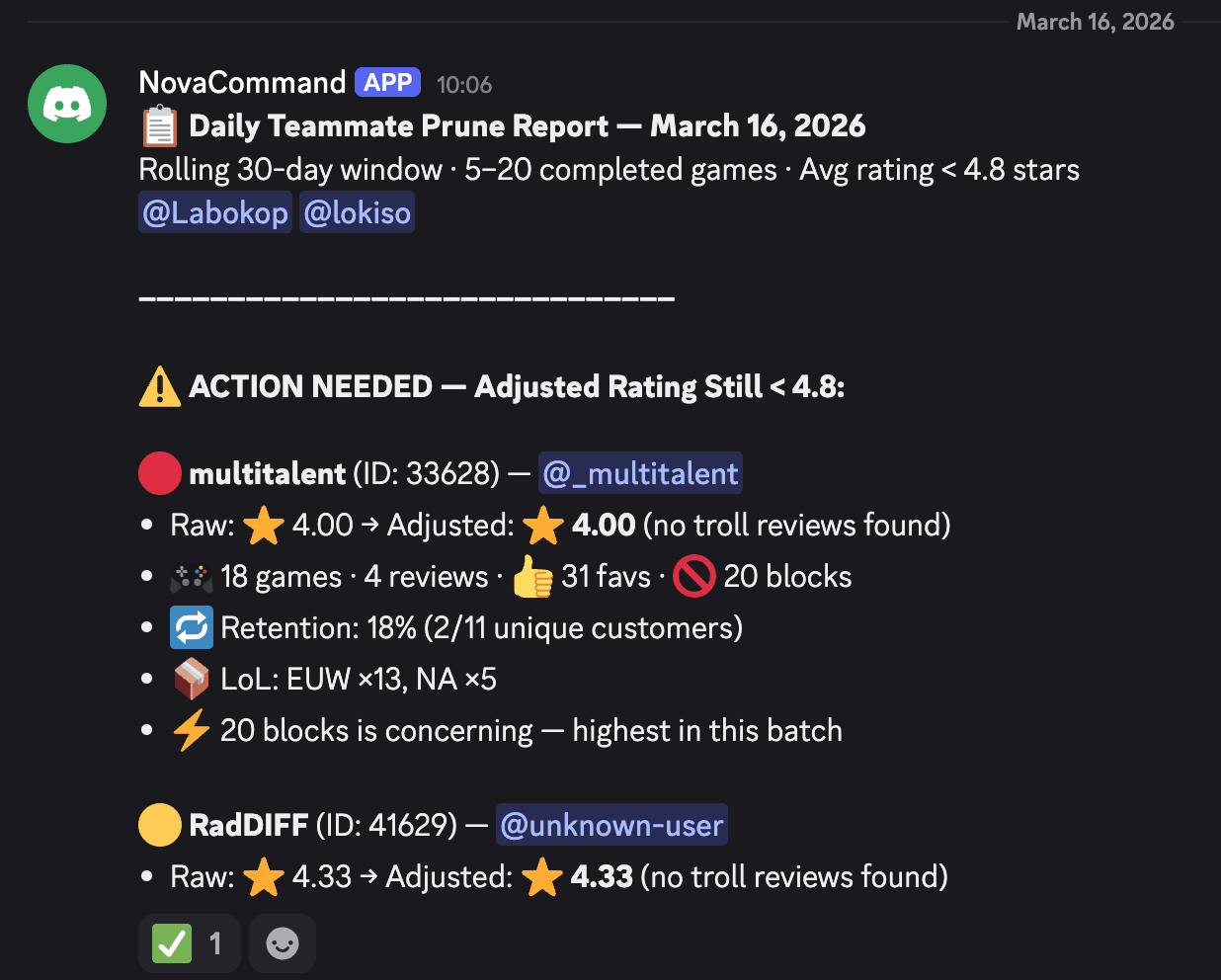
This ran unprompted
Nobody prompted it. An agent checked the database, crunched retention numbers, flagged underperformers, and pinged the right people — all on its own.
That's what we're building today.
Autonomy vs Controllability
Autonomy — Will it do it for you, or do you have to do it yourself?Controllability — Can you trust it not to mess things up?Expertise — How much skill does it take to get results?











Audit your operations
Most AI projects fail because teams automate the wrong thing. Audit first so you build agents that actually save time and money.
Break
Back in 15 minutes.
Pick your first workflow
From your audit, choose one workflow that checks these boxes.
Start small, prove value, then expand.
Audit your workflow
Walk through each OODA phase as a stakeholder. Answer these questions to align the agent with your business before you build.
Triggers, data sources, and signals that something changed.
Business rules, what "good" vs "bad" looks like, and context a new hire would need.
Which calls it can make alone, where a human must approve, and when to escalate.
Systems it writes to, how you verify success, and how you roll back.
If you can answer every question clearly, the workflow is ready to agenticize. If not, you have found the gaps to fill first.
Map your workflow
How do you spot a dying ad, kill it, and spin up a better one? Draw every step — if you cannot draw it, you cannot automate it.
What are the steps?
Pull metrics, review creatives, adjust bids, write copy, launch — list them all.
Where are the decisions?
CPA too high? CTR dropping? ROAS below target? Each threshold is a branch.
Where are the handoffs?
When does a human need to approve new creative, budgets, or audience changes?
Grab a pen and paper. Draw your workflow now — we will use it in the next exercise.
Same thinking, new vocabulary
Your OODA audit answers map directly to how you set up an AI employee in Tensol. Three columns — same row, same idea.
Your turn: Fill in these same three columns for the workflow you picked. That becomes your build plan.
Four questions to
hire an AI employee
Same questions you would ask when onboarding any new hire. Answer these and the employee is ready to work.
Who is this employee?
SOUL.md — the role brief"You are a support agent for Acme Co. You are friendly, concise, and always check past tickets before answering."
What can they access?
Connected tools — one-click OAuthSlack, Zendesk, your knowledge base. Whatever this role needs to do its job — nothing more.
What are their rules?
SKILL.md — decision guardrails"Refunds over $200 — escalate to a human. Under $200 — approve and notify the customer."
What starts their workday?
Trigger — event, schedule, or channel"Every time a new support ticket comes in" or "Every morning at 8 AM" or "When someone messages in #support."
Get your environment ready
Open Tensol
Navigate to the URL on the screen. Sign in with the credentials on your table card.
Create a workspace
Click "New workspace". Name it after your team or workflow.
Verify connection
You should see the dashboard. Raise your hand if you are stuck.
Build Agent #1
Watch me build a working agent end-to-end. After lunch, you'll build your own.
Define the role
SOUL.md
Connect the tools
OAuth
Set the rules
SKILL.md
Trigger it and watch it work
Live run
Lunch break
Refuel. We reconvene in 45 minutes.
Build Agent #2
Your turn. Same steps you just watched — now on your own workflow.
Choose a template
Pick the role closest to what you need — support, sales, ops, or start from scratch. The template gives you a head start.
Connect your tools
One-click OAuth — Slack, Gmail, your CRM, spreadsheets. No API keys, no passwords to copy. Just click "Connect."
Write the brief
Describe the role in plain English — who this employee is, what it does, and when to escalate. Like onboarding a new hire.
Your employees are live.
Now manage them.
Your AI employees are already running. But just like a new hire, the first week needs attention. Here is what can go wrong.
It gets confused
A message arrives that does not match anything in its brief. It guesses — and guesses wrong.
It over-acts
The employee is too eager — it replies to things it should ignore, or takes action before a human reviews.
Nobody checks
It runs 24/7. If nobody reviews what it did this week, small mistakes compound into big ones.
The goal: Find every weak spot in the next 30 minutes — so your customers and team only see the polished version.
Break
Back in 15 minutes.
Iterate and refine
Your agent is working. Now make it better.
Test edge cases
Send it vague requests, out-of-scope questions, messy input. See where it breaks.
Refine the brief
Update SOUL.md and SKILL.md based on what you found. Be more specific about edge cases.
Tune the guardrails
Adjust escalation thresholds, add new rules for scenarios you did not anticipate.
Run it for real
Point it at your actual workflow. Watch it handle live data for 10 minutes.
Manage your AI team
You hired AI employees today. Now manage them the way you would manage any new team member.
Review weekly
Check what your AI employees did this week. Skim the activity log. Spot anything that looks off.
Track the ROI
Each employee has a cost. Compare it to what the work used to cost in hours and mistakes. If it is not saving you money, change its role.
Keep humans in the loop
For big decisions — contracts, refunds, public communications — the employee should recommend, not act. You approve.
Coach and improve
Every time an employee escalates to you is a learning opportunity. Update its brief so it handles that case next time.
The leverage is yours to take
Every major platform is racing to put agent-level power in the hands of business owners — not engineers. The tools are here. The question is whether you use them.
The biggest bet on future capability in history
$700B+ in AI infrastructure spending in 2026 alone. Not recovery money — companies investing in what every person and business will be able to do next.
What took engineers is becoming point-and-click
Agent building went from custom code to conversation. Gartner: 40% of enterprise apps will have AI agents by end of 2026, up from under 5% in 2025.
Your edge is not technical — it is strategic
The people who win are the ones who know their business deeply enough to direct these tools. Technical skill is being commoditized. Business judgment is not.
Claude Cowork
Agentic AI on your files — no code, no terminal. Point it at a folder, describe the job.
Copilot Studio
Build agents by describing them in plain English. Plugs into Teams, Outlook, SharePoint.
Agentforce
18,500+ deals. Reddit cut resolution time from 9 minutes to 84 seconds.
Manus
General-purpose agent — research, data, reports. $125M revenue in 8 months, acquired for $2B.
Look what you built.
You brought a real business. You are leaving with a working system.
Check on your employees
Open the activity log. See what they handled overnight.
Coach what they got wrong
Update the brief. Each fix makes them permanently smarter.
Show your team
The best way to get buy-in is proof. Share what they did this week.
Stop prompting. Start orchestrating.
Let’s Build Together
Need help turning today’s prototype into a production-grade AI system? We’ll partner with you end-to-end.
gomalabs.com